 Antimatter
Operations
Keep an eye on the server, make it handle more people, decide how long data is kept, and fix the problems administrators meet most often.
Health checks
amctl --local system status(in the container:docker compose exec antimatter amctl --local system status). The Docker image's health check runs it every 30 seconds, sodocker compose psshowshealthyorunhealthy.GET /api/v4/system/pinganswers without signing in, for an outside monitor or a load balancer:curl -fsS https://chat.example.com/api/v4/system/ping.antimatter db pingchecks that the database is reachable with the configured settings.- System Console › Reporting › System Statistics shows the number of users, posts and sessions.
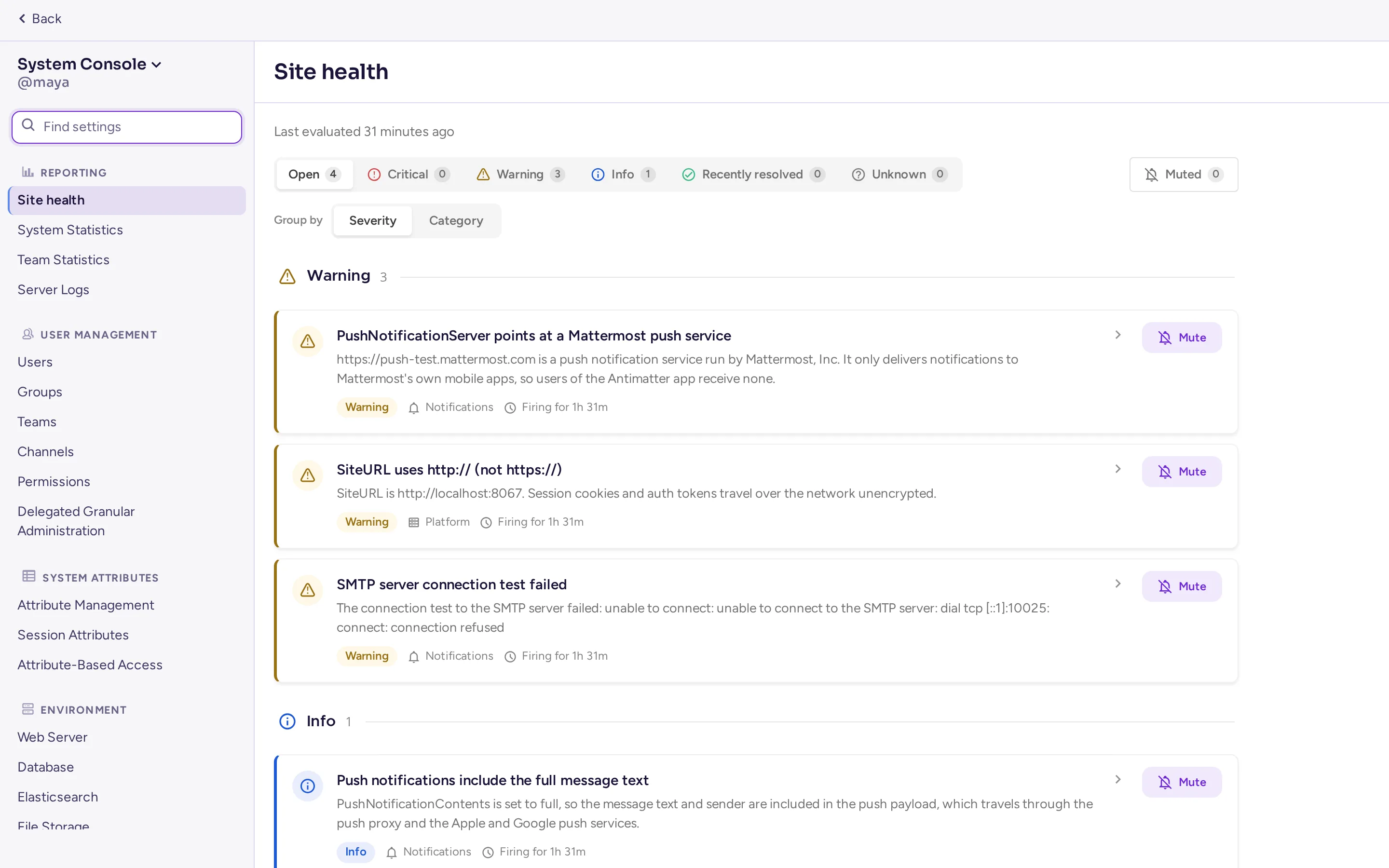
- System Console › Reporting › Site health checks the database, search, cluster, push, jobs, sign-in, compliance and more every hour, and lists what needs attention with its severity; mute a finding you don't need to see again, and find it later on the Muted tab with who muted it and when. On by default; it replaces Workspace Optimization for full system administrators (a delegated administrator who can only read site statistics still sees Workspace Optimization). Turn it off with
AM_FEATUREFLAGS_HEALTHDASHBOARD=false.
Metrics
The server can publish Prometheus metrics: request rates and durations, websocket connections, database and cache use, jobs, plugin hooks and more. Turn them on in System Console › Environment › Performance Monitoring:
| Setting | Key and variable | Default |
|---|---|---|
| Enable Performance Monitoring | MetricsSettings.Enable, AM_METRICSSETTINGS_ENABLE | off |
| Listen Address | MetricsSettings.ListenAddress, AM_METRICSSETTINGS_LISTENADDRESS | :8067 |
| Enable Client Performance Monitoring | MetricsSettings.EnableClientMetrics | on: browsers and apps report their own timings |
Prometheus then scrapes http://<server>:8067/metrics. Each metric is published under its Mattermost name (mattermost_…) and its Antimatter name (antimatter_…), so existing Mattermost dashboards keep working. Apps publish their own metrics, for example the Agents app at /plugins/mattermost-ai/metrics.
The metrics port needs no sign-in: keep it on a private network. The site's compose file doesn't publish it; to scrape it from the host, add "127.0.0.1:8067:8067" to the ports of the antimatter service.
The Metrics app
Without a Prometheus server, the Metrics app (see Bundled apps) collects the same metrics into a small time-series database inside Antimatter: every 60 seconds, kept 15 days. Turning on Enable Performance Monitoring enables the app too, unless you have switched it off yourself. It turns on the metrics endpoint when it starts. Its page in System Console › Plugins shows the database's size and lets you download dumps of the data, for your own analysis or to attach to a bug report; the latest day is also added to support packets.
Support packet
A support packet is a zip file with what's needed to diagnose a problem: versions, statistics, the configuration with its secrets removed, the list of apps and jobs, the database schema, the recent log and performance profiles. Generate one with amctl system supportpacket, or in the System Console from the menu at the top of its sidebar (Commercial Support, which then lets you choose what to include). Read it before you share it: it doesn't contain messages, but it does contain names of communities, users and settings.
Performance and scaling
One server with 2 CPU cores and 4 GB of memory serves a few hundred people. Before adding servers, look at:
- The database. PostgreSQL does most of the work: give it fast storage and memory. Read replicas can take the read load (
SqlSettings.DataSourceReplicas, a list of connection URLs). - Search. Messages are searched in the database by default. For large servers, Elasticsearch or OpenSearch can take over search and indexing: System Console › Environment › Elasticsearch (
ElasticsearchSettings: Backend type Elasticsearch or OpenSearch, Server Connection Address, credentials, then enable indexing, build the index, and enable searching). - Calls. Call media are the heaviest load. Move them to an rtcd server: see Calls and voice.
- Open files. Each connected person keeps a websocket open. The production compose file of antimatter-docker raises the limit to 49152 (
ulimits: nofile); do the same with systemd (LimitNOFILE). - Logs. Lower
LogSettings.ConsoleLeveltoINFOorWARN:DEBUGlogs a lot on a busy server. - Compression. With Web Server Mode set to gzip,
AM_FEATUREFLAGS_ENABLEBROTLICOMPRESSION=truenegotiates Brotli compression for API responses with clients that accept it, instead of gzip (optional, off by default; restart the server after changing it).
High availability
Several Antimatter servers can run as a cluster behind a load balancer, without a licence. They must share the same PostgreSQL database, the same S3 file storage, and the configuration in the database (AM_CONFIG). In System Console › Environment › High Availability (ClusterSettings): turn on Enable High Availability Mode (ClusterSettings.Enable), give every node the same Cluster Name (ClusterSettings.ClusterName), and let the nodes reach each other on the gossip port, 8074 TCP and UDP (ClusterSettings.GossipPort). Nodes find each other through the database. The load balancer must pass websockets. For calls in a cluster, use rtcd.
Data retention
By default Antimatter keeps every message and file forever. To delete old ones automatically, go to System Console › Compliance › Data Retention Policies:
- The Global retention policy sets Channel & direct message retention and File retention for the whole server: Keep forever, or a number of hours, days or years (
DataRetentionSettings.EnableMessageDeletion,MessageRetentionHours,EnableFileDeletion,FileRetentionHours). - Custom retention policies set another duration for chosen communities and channels.
- The deletion job runs every day at the time you choose (
DataRetentionSettings.DeletionJobStartTime,02:00UTC by default). Run Deletion Job Now runs it at once, and the Policy log lists what each run removed.
Compliance export and audit logs
- System Console › Compliance › Compliance Export exports all messages and files every day (Enable Compliance Export,
MessageExportSettings.EnableExport, off by default; Compliance Export Time,01:00by default) in one of the formats archiving systems read: CSV, Actiance XML, or Global Relay (a zip file, or EML sent over SMTP).amctl compliance-exportruns and downloads exports from the command line. - Compliance Monitoring (
ComplianceSettings) writes daily reports to a directory. It is the older mechanism; prefer Compliance Export. - Audit Logging (beta,
ExperimentalAuditSettings) records administrative and security events (sign-ins, permission and setting changes) to a file of its own. A single sign-on record also says whether that sign-in created the account. - Custom Terms of Service asks everyone to accept your terms before using Antimatter, and again after you change them.
Common problems
"Cannot connect to the server", or messages only appear after a reload
The websocket doesn't get through. Check that the reverse proxy passes Upgrade and Connection headers (see the nginx example), and that the site URL matches the address in the browser exactly, including https.
Uploads fail with "413 Request Entity Too Large"
The proxy refuses the size. Raise its limit (nginx client_max_body_size) to at least Maximum File Size in System Console › Environment › File Storage (FileSettings.MaxFileSize, 100 MB by default).
People can't start calls, or join but hear nothing
If nobody but administrators can start calls, turn Calls' Test mode off. If the call button is missing in a community's channels, the community is of the Community kind, where calls are off by default: its channel or community admins can turn calls on in a channel, or change the community's kind (see Where calls are on). If people join but hear nothing, the media port is blocked or the server announces the wrong address: open 8443 UDP and TCP, and set ICE Host Override behind NAT. People on networks that block both need a TURN server. See Calls and voice.
The GIF picker is empty
Check GIF service URL (http://gifs:8080/v2 with the site's compose file) and API key (the GIFS_API_KEY of .env) in System Console › Plugins › GIFs, and that the gifs service runs: docker compose ps gifs.
No emails arrive
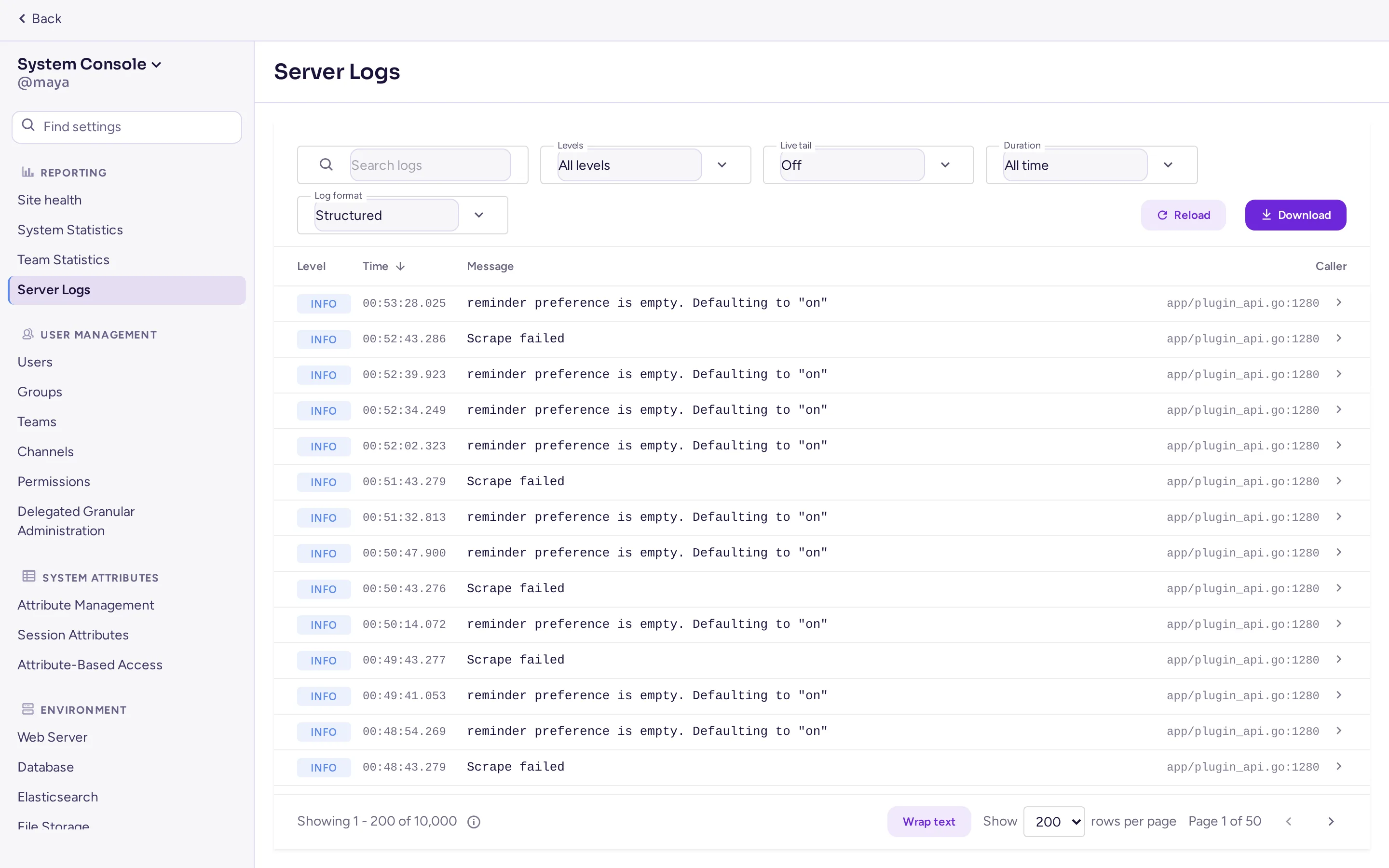
Use Test Connection in System Console › Environment › SMTP, check that Notification From Address isn't still test@example.com, and search the log for smtp or mail.
An app shows "Failed to start"
Look for its id in the log (docker compose logs antimatter | grep <app id>). Disable and enable it in Plugin Management to restart it.
The server doesn't start
Read the end of its log. Most often the database is unreachable (check AM_SQLSETTINGS_DATASOURCE with antimatter db ping), a database migration failed (restore the backup taken before the upgrade and report the error), or the listen port is taken.
Locked out of the administrator account
From the server, local mode needs no password:
docker compose exec antimatter amctl --local user change-password admin --password 'a-new-password'
docker compose exec antimatter amctl --local user resetmfa admin
docker compose exec antimatter amctl --local roles system-admin admin
Reporting a bug
Open an issue in the Antimatter community repository, with the version, how you installed, what you did and the relevant log lines. Report security problems privately, as the security policy explains.